The Ultimate Setup Guide for Your Hw Q90R
The pursuit of the perfect home cinema experience often leads enthusiasts toward high-end soundbars that promise to replicate the immersion of a dedicated wired surround sound system without the architectural headache of running cables through walls and ceilings. At the apex of this evolution sits the Hw Q90R, a flagship soundbar system that remains a benchmark for cinematic audio in a living room environment. While newer models have since entered the market, the robust engineering and sheer speaker count of this system continue to make it a prized centerpiece for home theaters. However, the difference between a soundbar that sounds "good" and one that provides a "breathtaking" three-dimensional soundstage lies almost entirely in the precision of the setup and the optimization of the acoustic environment.
This guide serves as a comprehensive resource for owners and prospective buyers of the Hw Q90R, detailing the nuances of physical placement, software configuration, and the technical underpinnings that make this 7.1.4-channel system a powerhouse of Dolby Atmos and DTS:X performance. By understanding the interaction between the up-firing drivers and the physical boundaries of a room, users can unlock the full potential of a system designed to place every raindrop and soaring aircraft exactly where the sound engineer intended.
Advanced Product Analysis: The Engineering Behind the Sound
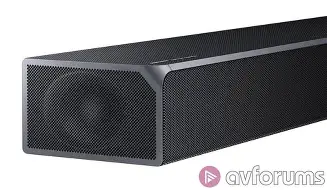
To set up the Hw Q90R correctly, one must first understand what makes its internal architecture unique. Unlike standard 2.1 or 5.1 systems, the 7.1.4 configuration of this flagship means there are thirteen individual drivers housed within the main bar, two rear speakers, and a thunderous 8-inch wireless subwoofer. The ".4" in the configuration refers to the four up-firing drivers—two located on the top of the main bar and one on the top of each rear satellite speaker. These drivers are designed to bounce sound off the ceiling, creating the "height" channels essential for object-based audio formats like Dolby Atmos.
The main bar features dedicated side-firing speakers that aim to widen the soundstage by reflecting audio off the side walls. This creates a virtual "width" that makes the front stage feel significantly larger than the physical dimensions of the bar itself. A dedicated center channel ensures that dialogue remains crisp and anchored to the screen, even when explosive action sequences are occurring in the surround and height channels. The synergy between the Harmon Kardon tuning and the high-wattage amplification results in a system that doesn't just play loud; it plays with authority and dynamic range that rivals many entry-level component systems.
For buyers, the appeal of this system often centers on its ability to handle "True Atmos." Many competing products use virtualization or "psychoacoustic" processing to simulate height, but the Hw Q90R uses physical hardware to move air toward the ceiling. This hardware-first approach is why the system is physically substantial—the bar is nearly 4 feet long and weighs over 19 pounds, requiring a sturdy media console or professional wall mounting to stay secure.
Optimal Physical Placement Strategy
The physical environment is the most critical variable in the performance of the Hw Q90R. Because the system relies on sound reflections, a room with vaulted or slanted ceilings will significantly degrade the Atmos effect. For the best results, the system should be placed in a room with flat, reflective ceilings between 8 and 12 feet in height. Soft materials like acoustic foam or heavy curtains on the ceiling can absorb the sound waves intended for reflection, so keeping the "bounce zones" clear is paramount.
The Main Bar and Side Reflections
Position the main bar directly centered under the television. Ideally, the bar should sit at the very front edge of the media cabinet to prevent sound from the up-firing drivers from reflecting off the cabinet surface before reaching the ceiling. Furthermore, ensuring there is at least two feet of clearance from the side walls allows the side-firing drivers to project sound effectively, creating the intended peripheral width. If the bar is tucked into a cubby or a recessed shelf, the side-firing and up-firing speakers will be completely muffled, effectively turning a flagship 7.1.4 system into a standard 3.1 setup.
Rear Satellite Speaker Calibration
The rear speakers are not just "ambience" channels; they are full-range units with their own up-firing drivers. They should be placed slightly behind the primary listening position, angled inward toward the center of the couch. For the most immersive Atmos experience, these satellites should be elevated to ear level when seated. Placing them too high—near the ceiling—negates the height effect of the up-firing drivers, as there is no room left for the sound to bounce before hitting the listener. Conversely, placing them too low behind a sofa will block the primary surround drivers, leading to a muffled rear soundstage.
Discover deals on Electronics — updated daily.
Shop Amazon →Subwoofer Integration
The 8-inch subwoofer is wireless, allowing for flexible placement, but "wireless" only refers to the signal; it still requires a power outlet. The "subwoofer crawl" is a highly recommended technique for this system. Place the subwoofer in the primary seating position, play a bass-heavy track, and crawl around the room to find where the bass sounds tightest and most balanced. Usually, placing the subwoofer near a front corner can increase the perceived volume (corner loading), but moving it a few inches away from the wall can often improve the clarity of the low frequencies, preventing "boomy" or muddy bass notes.
Connectivity and Signal Integrity
One of the most common mistakes users make is using the wrong cables or ports, which can limit the system to basic 5.1 audio or even stereo. To experience the full 7.1.4 Dolby Atmos capabilities, the Hw Q90R must be connected via HDMI. The system supports HDMI eARC (Enhanced Audio Return Channel) via firmware updates, which allows for the transmission of uncompressed 24-bit audio and high-bitrate Atmos from a compatible TV.
For those using external devices like an Apple TV 4K, Shield TV, or a 4K Blu-ray player, the safest configuration is to plug the source device directly into one of the two HDMI inputs on the back of the soundbar itself. This ensures that the soundbar extracts the high-resolution audio signal before passing the video through to the TV. The Hw Q90R supports 4K HDR10+ pass-through, ensuring that your visual quality is not compromised. If you connect your devices to the TV and use the ARC/eARC connection to send audio back to the bar, ensure that both the TV and the soundbar have "HDMI-CEC" and "eARC" enabled in their respective settings menus.
Pros and Cons of the Hw Q90R System
- Unrivaled Immersion: The 7.1.4 physical speaker layout provides a genuine "bubble of sound" that virtualized soundbars cannot match, especially for height-heavy content like rain or overhead flight.
- Build Quality and Aesthetics: The metal grille finish and heavy-duty chassis give the system a premium, industrial feel that complements modern high-end televisions.
- Powerful Low End: The included 8-inch subwoofer manages to reach deep frequencies (down to approximately 34Hz) with enough displacement to rattle the floor during action sequences.
- Tuning by Harman Kardon: The partnership results in a sophisticated sound signature that handles music with more musicality than most home-theater-centric soundbars.
- HDMI Pass-Through: Having two 4K-capable HDMI inputs allows the bar to act as a mini-receiver, solving the issue of limited ports on older TVs.
- Disadvantage: Physical Footprint: The bar is exceptionally wide, which may not fit between the legs of some smaller TV stands, requiring it to be placed in front or wall-mounted.
- Disadvantage: Software Sensitivity: The system can occasionally experience "handshake" issues with certain TV brands, requiring a specific power-on sequence to recognize the eARC signal.
- Disadvantage: Minimalist Display: The small LED display is hidden behind the front grille and can only show a few characters at a time, making deep menu navigation slightly tedious.
Detailed Specifications and Performance Metrics
| Feature | Specification | Benefit/Use Case |
|---|---|---|
| Total Speaker Count | 17 individual drivers | Provides precise object tracking across the soundstage. |
| Amplification Power | 512 Watts | Ensures high volume without distortion in large rooms. |
| Audio Decoding | Dolby Atmos, DTS:X, DTS Digital Surround, Dolby Digital Plus | Complete compatibility with modern streaming and physical media. |
| Connectivity | 2 HDMI In, 1 HDMI Out (eARC), Optical, Bluetooth, Wi-Fi | Flexible ways to connect consoles, players, and smartphones. |
| Smart Features | Amazon Alexa Compatible, SmartThings App Support | Allows for voice control and remote calibration via phone. |
| HDR Support | HDR10, HDR10+, 4K/60Hz Pass-through | Ensures the highest video quality passes through to the TV. |
A Comprehensive Buying Guide for Enthusiasts
When considering the Hw Q90R, it is essential to evaluate your specific living conditions. This is not a "one size fits all" audio solution; it is a specialized piece of equipment that rewards those with the right room layout. If you live in a small apartment with thin walls, the sheer power of the 8-inch subwoofer may be difficult to manage without upsetting neighbors. Conversely, in a large, open-concept floor plan, the side-firing speakers may struggle to find a surface to reflect off of, potentially narrowing the soundstage.
You should prioritize this system if you are a "physical media" collector. While streaming services like Netflix and Disney+ offer Dolby Atmos, it is often compressed (Dolby Digital Plus). The Hw Q90R truly shines when fed uncompressed Dolby TrueHD Atmos from a 4K Blu-ray. The difference in overhead clarity and the "weight" of the surround channels is immediately audible. If your primary use case is watching news or sitcoms, this system is likely overkill; it is engineered for cinematic masterpieces, high-fidelity gaming on PS5 or Xbox Series X, and orchestral music.
Another factor to consider is the "SmartThings" ecosystem. By using the app, you gain access to a 7-band equalizer, allowing you to fine-tune the audio if the default "Standard" or "Adaptive" modes do not suit your taste. The "Adaptive Sound" mode is particularly impressive for buyers who don't want to fiddle with settings; it analyzes the content in real-time and optimizes the voice clarity for quiet scenes while expanding the dynamic range for action.
Calibration and Fine-Tuning
Once the physical hardware is in place and the cables are connected, the final step is software calibration. Unlike some competitors that include a dedicated calibration microphone, the Hw Q90R relies on manual channel level adjustment. This gives the user more control but requires a more attentive ear. The most important adjustment for Atmos fans is the "Top" channel volume. By default, these can sometimes be too quiet. Setting the "Top Front" and "Top Rear" channels to +2 or +3 can help make the height effects more pronounced in rooms with higher ceilings.
Looking for the best Electronics deals on Amazon?
View Offers →It is also advisable to check the "Virtual" setting in the soundbar menu. Ensure this is turned OFF if you are playing native Atmos content. Using the virtualizer on top of a physical 7.1.4 signal can introduce phasing issues and muddle the directional accuracy of the objects. For gamers, the "Game Pro" mode is a standout feature, as it automatically activates when it detects a console, shifting the focus to directional cues that help in competitive play, such as hearing footsteps behind you or the location of an enemy's gunfire.
Maintenance and Firmware Updates
To ensure long-term stability, keep the soundbar connected to your home Wi-Fi via the SmartThings app. Samsung periodically releases firmware updates that improve eARC compatibility and subwoofer connection stability. If you ever experience "dropping" from the rear speakers, it is usually due to 2.4GHz Wi-Fi interference. Moving your router a few feet away from the soundbar or the rear speakers can often resolve these wireless hiccups instantly.
Real-World Use Cases: Why It Still Matters
Consider the typical movie night: a group of friends gathered on a sectional sofa. In a standard soundbar setup, only the person in the middle gets the "sweet spot." However, because the Hw Q90R uses physical side-firing and rear speakers, the sweet spot is significantly wider. A person sitting on the far left of the couch will still clearly hear the rear-right channel, maintaining the sense of place within the movie's environment. This makes it an excellent choice for families or those who frequently host viewing parties.
For the "quiet hours" listener, the Hw Q90R offers a "Night Mode" which compresses the dynamic range. This allows you to hear dialogue clearly without the subwoofer waking up the household during a sudden explosion. This versatility—from a thunderous theater experience to a refined late-night speaker—is what defines a flagship product. It handles the extremes of audio reproduction with equal grace.
Ultimately, the Hw Q90R represents a peak in soundbar technology where the limitations of the form factor are overcome by sheer engineering force. It bridges the gap between the simplicity of a single bar and the complexity of an 11-piece wired system. While it requires a bit of effort to position each component and ensure the HDMI chain is correct, the reward is an audio experience that transforms a simple television screen into a window into another world. Whether it’s the subtle rustle of leaves in a forest scene or the earth-shaking roar of a spaceship launch, this setup ensures you are in the center of the action.
By following the steps in this guide—centering the bar, optimizing the bounce zones for the Atmos drivers, ensuring eARC connectivity, and fine-tuning the individual channel levels—you can be confident that you are hearing your favorite media exactly as the creators intended. The Hw Q90R is more than just an electronics purchase; it is an investment in how you experience stories, music, and games for years to come.